Here is how to set it up:
http://gigaom.com/apple/ipad-quick-tip-enabling-multiple-google-calendars/
Monday, September 03, 2012
Monday, June 11, 2012
HP Laserjet 1022n under Windows 7
Use the 1020 driver, but turn off bidirectional support, to avoid a page job printing repeatedly. See:
http://h10025.www1.hp.com/ewfrf/wc/document?docname=c02205132&tmp_track_link=ot_faqs/top_issues/en_us/c02205132/loc:10&lc=en&dlc=en&cc=us&lang=en&product=4110396
Also suggestions on installing driver:
http://www.w7forums.com/drivers-hp-laserjet-1022n-printer-t5048p2.html
http://h10025.www1.hp.com/ewfrf/wc/document?docname=c02205132&tmp_track_link=ot_faqs/top_issues/en_us/c02205132/loc:10&lc=en&dlc=en&cc=us&lang=en&product=4110396
Also suggestions on installing driver:
http://www.w7forums.com/drivers-hp-laserjet-1022n-printer-t5048p2.html


Wednesday, November 02, 2011
emacs --daemon
Good blog post about running Emacs in daemon mode:
http://emacs-fu.blogspot.com/2009/02/emacs-daemon.html
Also a thread on how to cleanly shut the daemon down:
http://stackoverflow.com/questions/1167484/how-to-gracefully-shutdown-emacs-daemon
http://emacs-fu.blogspot.com/2009/02/emacs-daemon.html
Also a thread on how to cleanly shut the daemon down:
http://stackoverflow.com/questions/1167484/how-to-gracefully-shutdown-emacs-daemon
Friday, October 28, 2011
disconnecting iPod from Linux
When I plug in an iPod into a machine running Ubuntu, the iPod auto-connects, but is not actually mounted. This is especially problematic when I am running under i3 or other window manager which does not have a system tray or other mechanism for listing connected devices.
Turns out it is easy to disconnect:
sudo eject /dev/sdb1
Season the device path as appropriate for your system. I typically find the device name by looking through /var/log/messages for the USB messages for when I connect the iPod.
Turns out it is easy to disconnect:
sudo eject /dev/sdb1
Season the device path as appropriate for your system. I typically find the device name by looking through /var/log/messages for the USB messages for when I connect the iPod.
Wednesday, October 26, 2011
clonezilla (disk imaging) quickstart
[NOTE: I have found Paragon Backup & Recovery tool to be better fit for me, and really like it: http://www.paragon-software.com/home/br-free/]
Steps for setting up Clonezilla an a USB thumb drive:
Steps for setting up Clonezilla an a USB thumb drive:
- go to http://tuxboot.org/download.php
- click Files on SourceForge
- download tuxboot*.exe (or other, depending on your currently booted OS)
- run tuxboot
- the defaults are good usually:
- clonezilla_live_stable chosen
- no Pre Downloaded images selected
- MD5 Check selected
- Type: USB
- Drive should be already the USB drive you have plugged in
- hit OK
Tuesday, October 25, 2011
gizmo's freeware

This is an excellent site containing reviews of best freeware in many categories.
Some notable reviews:
- http://www.techsupportalert.com/best-free-anti-virus-software.htm
- http://www.techsupportalert.com/content/top-freeware-picks-category-editors.htm
- http://www.techsupportalert.com/best-free-firewall.htm
- http://www.techsupportalert.com/best-free-cd-dvd-burning-software.htm
- http://www.techsupportalert.com/best-free-pdf-writer.htm
- http://www.techsupportalert.com/best-free-disk-de-fragmenter.htm
- http://www.techsupportalert.com/best-free-drive-imaging-program.htm
- http://www.techsupportalert.com/best-free-portable-programs.htm
- http://www.techsupportalert.com/best-free-non-adobe-pdf-reader.htm
www.softwarepatch.com
 This is a great website for getting at direct downloads of notable HW/SW patches, service packs, security updates, DirectX, etc.
http://www.softwarepatch.com
Monday, October 24, 2011
checking USB thumb drives
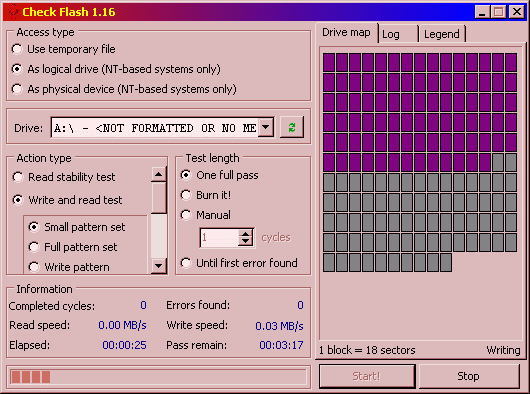 In my experience USB "thumb" drives are notoriously unreliable, but that's something you find out only once you attempt to read back the data you've "written" to the device. Always check your medium before use.
Great tool that I found for such drive validation: "Check Flash": http://mikelab.kiev.ua/index_en.php?page=PROGRAMS/chkflsh_en
Sunday, October 23, 2011
Saturday, October 22, 2011
Totes "Doorman/Gentleman" umbrella
 I recently broke my favourite umbrella, the Totes classic black "Doorman" or "Gentleman" stick umbrella, and had a hard time finding a place to buy a replacement from.
Naturally, Totes online has it, but they don't ship to Canada, and their Canadian store is only going to come online next year. Amazon.com does not ship to Canada. Sigh.
Finally, success! Someone that has it AND ships to Canada:
http://www.beltoutlet.com
It can be found here:
http://www.beltoutlet.com/meaustumbto.html
Now let's see how fast they can get it here.
Friday, October 21, 2011
Monday as first day of week in GNOME
A lot of approaches on the Net specify hacking the locale files; e.g.:
http://ubuntuforums.org/showthread.php?t=813945
However, a far simpler and certainly less intrusive procedure is to simply modify default LC_TIME:
http://askubuntu.com/questions/6016/how-to-set-monday-as-the-first-day-of-the-week-in-gnome-calendar-applet
Specifically:
http://ubuntuforums.org/showthread.php?t=813945
However, a far simpler and certainly less intrusive procedure is to simply modify default LC_TIME:
http://askubuntu.com/questions/6016/how-to-set-monday-as-the-first-day-of-the-week-in-gnome-calendar-applet
Specifically:
- in /etc/default/locale add:
LC_TIME="en_GB.UTF-8" - log out, then log back in
Thursday, October 20, 2011
hunting for dock for Nexus S
Best deal on the "lean back" models is here:
http://shop.brando.com/google-nexus-s-usb-cradle_p05659c1265d106.html
http://shop.brando.com/google-nexus-s-2nd-battery-usb-cradle_p05660c1265d106.html
Interestingly, you can hack the dock by adding resistors, to get different results:
http://forum.xda-developers.com/showpost.php?p=12160799&postcount=40
http://forum.xda-developers.com/showthread.php?t=820275
http://shop.brando.com/google-nexus-s-usb-cradle_p05659c1265d106.html
http://shop.brando.com/google-nexus-s-2nd-battery-usb-cradle_p05660c1265d106.html
Interestingly, you can hack the dock by adding resistors, to get different results:
http://forum.xda-developers.com/showpost.php?p=12160799&postcount=40
http://forum.xda-developers.com/showthread.php?t=820275
Wednesday, October 19, 2011
Monday, October 17, 2011
fixing broken Ubuntu Unity
I must have clicked something naughty in Compiz Config Settings Manager, because I lost the top and left side panels, and generally there was not much more than just the desktop background. I was stumped on how to fix this.
Then I found:
http://www.tuxgarage.com/2011/04/missing-top-and-side-panels-in-unity.html
Very good walkthrough for fixing Unity.
In the end, I executed the "Reset Compiz" section, and things are back to normal.
Then I found:
http://www.tuxgarage.com/2011/04/missing-top-and-side-panels-in-unity.html
Very good walkthrough for fixing Unity.
In the end, I executed the "Reset Compiz" section, and things are back to normal.
Sunday, October 16, 2011
setting static IP in Ubuntu
By default recent Ubuntus (e.g., 11.10) use Network Manager, which makes things simple:
- click network icon in system tray
- Edit Connections
- select the one entry that you see there (unless your network is not working)
- Edit...
- IPv4 Settings
- From Method drop-down select Manual
- the rest should be straight forward
If not using Network Manager to manage network connections, you need to edit /etc/network/interfaces and add (adjust to own network parameters):
auto eth0
iface eth0 inet static
address 192.168.0.100
netmask 255.255.255.0
network 192.168.0.0
broadcast 192.168.0.255
gateway 192.168.0.1
cloning a github repo
Steps needed to download my repo from github to a new computer:
- install git
- generate SSH key
ssh-keygen -t rsa -C "your_email@youremail.com" - add public key to github keys associated with my identity
- have ssh-agent forget identies
ssh-add -d - now reread new ones
ssh-add - verify ssh setup is working (see http://help.github.com/ssh-issues/)
ssh -vT git@github.com - clone repo
git clone git://github.com/maciekk/emacs.git
Note that did not have to do a "git init" or "git remote add".
Sunday, October 02, 2011
Recommended book on Mathematics
This book has been highly recommended to me, I should check it out soon:
Mathematics: A Human Endeavor
Harold R. Jacobs
http://www.amazon.com/Mathematics-Endeavor-Harold-R-Jacobs/dp/071672426X
Mathematics: A Human Endeavor
Harold R. Jacobs
http://www.amazon.com/Mathematics-Endeavor-Harold-R-Jacobs/dp/071672426X
Sunday, September 11, 2011
configuring grub for auto-selecting Windows
Typically "Windows" is one of the last options in the GRUB menu, and thus rather brittle to selecting by static index. Instead, one can specify default GRUB choice by using the full option name. Here are the steps I followed last to update this on a recent Ubuntu (11.x) install:
- edit /etc/default/grub
- change GRUB_DEFAULT to FULL name of the Windows menu entry (best to copy-paste from your own config)
- save
- to propagate the change, run 'update-grub'
Note that, aside from the static integer index and the full menu item name, one can also use special string 'saved'. However IIRC in the past I was not fully happy with this option (did not stick maybe?).
Subscribe to:
Posts (Atom)