When I plug in an iPod into a machine running Ubuntu, the iPod auto-connects, but is not actually mounted. This is especially problematic when I am running under i3 or other window manager which does not have a system tray or other mechanism for listing connected devices.
Turns out it is easy to disconnect:
sudo eject /dev/sdb1
Season the device path as appropriate for your system. I typically find the device name by looking through /var/log/messages for the USB messages for when I connect the iPod.
Showing posts with label annoyances. Show all posts
Showing posts with label annoyances. Show all posts
Friday, October 28, 2011
Tuesday, October 25, 2011
www.softwarepatch.com
 This is a great website for getting at direct downloads of notable HW/SW patches, service packs, security updates, DirectX, etc.
http://www.softwarepatch.com


Monday, October 24, 2011
checking USB thumb drives
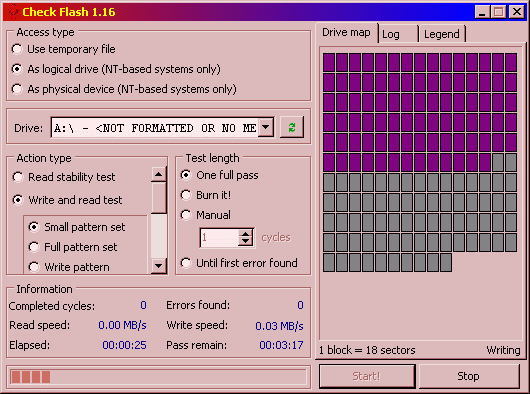 In my experience USB "thumb" drives are notoriously unreliable, but that's something you find out only once you attempt to read back the data you've "written" to the device. Always check your medium before use.
Great tool that I found for such drive validation: "Check Flash": http://mikelab.kiev.ua/index_en.php?page=PROGRAMS/chkflsh_en
Sunday, October 23, 2011
Friday, October 21, 2011
Monday as first day of week in GNOME
A lot of approaches on the Net specify hacking the locale files; e.g.:
http://ubuntuforums.org/showthread.php?t=813945
However, a far simpler and certainly less intrusive procedure is to simply modify default LC_TIME:
http://askubuntu.com/questions/6016/how-to-set-monday-as-the-first-day-of-the-week-in-gnome-calendar-applet
Specifically:
http://ubuntuforums.org/showthread.php?t=813945
However, a far simpler and certainly less intrusive procedure is to simply modify default LC_TIME:
http://askubuntu.com/questions/6016/how-to-set-monday-as-the-first-day-of-the-week-in-gnome-calendar-applet
Specifically:
- in /etc/default/locale add:
LC_TIME="en_GB.UTF-8" - log out, then log back in
Wednesday, October 19, 2011
Monday, October 17, 2011
fixing broken Ubuntu Unity
I must have clicked something naughty in Compiz Config Settings Manager, because I lost the top and left side panels, and generally there was not much more than just the desktop background. I was stumped on how to fix this.
Then I found:
http://www.tuxgarage.com/2011/04/missing-top-and-side-panels-in-unity.html
Very good walkthrough for fixing Unity.
In the end, I executed the "Reset Compiz" section, and things are back to normal.
Then I found:
http://www.tuxgarage.com/2011/04/missing-top-and-side-panels-in-unity.html
Very good walkthrough for fixing Unity.
In the end, I executed the "Reset Compiz" section, and things are back to normal.
Sunday, May 29, 2011
Notes from Ubuntu 11.04 install on Acer Aspire 522 - BZ499
- C-50 Ontario processor is 64-bit, so we'll use the 64 bit image: ubuntu-11.04-desktop-amd64.iso
- installed image onto USB stick using: 'sudo usb-creator-gtk' command
- make sure BIOS is configured to read from USB stick before HDD
- note: ubuntu kept hanging on me (mouse cursor/throbber frozen)... from posts on Net I suspect it is due to wireless driver
- solution: install with wired connection plugged in; this allowed me to do install no problem
- this link sounds relevant: http://fossplanet.com/f10/[bug-775034]-[new]-natty-freezes-due-acer-aspire-one-522-wireless-148584/
- suspend and hibernate work right out of the box with this (tested both)
- clicking on Additional Drivers in top bar, it seems we are already using Broadcom STA wireless driver (hence could conflict with other one)
- now able to use wifi (w/o wired plugged in) using following:
- add in /etc/modprobe.d/blacklist.conf this line: "blacklist atl1c"
- "sudo update-initramfs -u"
- suspend still works
- outstanding issues:
- (non-proprietary) video driver has poor YouTube playback, etc.
- after resume (from Suspend?) the Ubuntu top and left bars stop updating visually (Ubuntu One compiz component; switch to "Ubuntu Classic" in GDM and all is well)
- attempting ATI/AMD proprietary FGLRX gfx driver install...
- resume from suspend no longer working... can't even ping the machine (but did not check earlier that I actually could)
- went back to non-proprietary video drivers
Saturday, May 28, 2011
Ubuntu: gVim in fullscreen
Under compiz window manager, you need an extra package, which is not installed by default in Ubuntu 11.04. I've set the keybinding through gnome settings, and that was not sufficient to have the fullscreen action work.
Steps:
Source:
http://askubuntu.com/questions/2140/is-there-a-way-to-turn-gvim-into-fullscreen-mode
Steps:
- apt-get install compiz-plugins-extra
- Systems Settings > CompizConfig Settings Manager > Extra WM Actions > Toggle Fullscreen (provide keybinding, such as Alt-Enter)
- I found that I needed to restart the window manager for this to start working.
Source:
http://askubuntu.com/questions/2140/is-there-a-way-to-turn-gvim-into-fullscreen-mode
Ubuntu/gnome: disabling password request on resume
Problem: on resume from suspend, Ubuntu/GNOME presents password entry dialog, which is annoying.
Found a working solution here:
Namely:
1. As you've probably already done, uncheck:
"lock screen when screen saver is activated"
in the System->Preferences->Screen Saver menu.
2. Type gconf-editor in a terminal. Under apps/gnome-power-manager/locks check:
"use_screensaver_settings".
3. If still asked for password, you can (also in gconf-editor) go to desktop/gnome/lockdown and check:
"disable_lock_screen"
Credits to itslofty below for this tip!
I only had to do steps 1 and 2 on my Ubuntu 11.04 Natty Narwal on the Acer Aspire 522 BZ499.
Sunday, March 06, 2011
PDF virtual printer for Windows
Useful review of top free PDF printers:
http://www.techsupportalert.com/best-free-pdf-writer.htm
I chose to install BullZip one. Ran into issue where upon printing I would get error about macros. The following post was useful:
http://www.bullzip.com/phpBB/viewtopic.php?t=8538
In particular, the key seems to have been to run a tool for cleaning up after Mcaffee uninstall:
https://community.mcafee.com/message/110147
http://download.mcafee.com/products/licensed/cust_support_patches/MCPR.exe
http://www.techsupportalert.com/best-free-pdf-writer.htm
I chose to install BullZip one. Ran into issue where upon printing I would get error about macros. The following post was useful:
http://www.bullzip.com/phpBB/viewtopic.php?t=8538
In particular, the key seems to have been to run a tool for cleaning up after Mcaffee uninstall:
https://community.mcafee.com/message/110147
http://download.mcafee.com/products/licensed/cust_support_patches/MCPR.exe
Sunday, February 20, 2011
blocking Flash in Chrome
Interesting post, seen on https://chrome.google.com/webstore/detail/cdngiadmnkhgemkimkhiilgffbjijcie:
You don't need any 3rd pary extension to block flash anymore. To enable Chrome's built in Flashblock type 'about:flags' into the address bar and hit enter. Scroll down to the botton and enable 'Click to play', then restart your browser. Now click the wrench menu > Options > Under the hood > Content setting > Plug-ins and select 'Click to play' from the right hand side. You can use the Exception button to whitelist specific domains.
You don't need any 3rd pary extension to block flash anymore. To enable Chrome's built in Flashblock type 'about:flags' into the address bar and hit enter. Scroll down to the botton and enable 'Click to play', then restart your browser. Now click the wrench menu > Options > Under the hood > Content setting > Plug-ins and select 'Click to play' from the right hand side. You can use the Exception button to whitelist specific domains.
Saturday, February 05, 2011
remapping CapsLock to extra Control key
To that end, I found this link useful:
In *NIX:
 setxkbmap -option ctrl:swapcaps # Swap Left Control and Caps Lock
 setxkbmap -option ctrl:nocaps # Make Caps Lock a Control key
Sunday, December 05, 2010
console-kit-daemon x60
If you run 'htop' you might see over 60 processes named 'console-kit-daemon'. This seems to be a bug. On a mostly-single-user system one might as well uninstall 'consolekit' package (seems to be used for fast user switching).
For more see:
P.S. Alas, some other packages depend on 'consolekit'; not removing for now.
Sunday, June 14, 2009
OmniOutliner annoying binding
When I try to use Meta-Ctrl-< in Emacs while there is some text selected, OmniOutliner pops up and tries to insert the text as a "Default Clipping", which is terribly annoying, to say the least. After some looking around it seems to be a "Service" that can be turned off:
You need to remove the OmniOutliner Professional.service file from ~/Library/Services If you want to use OmniOutliner, you can changed the clipping shortcut through the OS X keyboard prefs or using some other app that will modify service shortcuts for you.and also
Yes, I did restart after deleting the .service file. I did however find a .plist file (as your colleague suggested) related to OmniOutliner somewhere and once that was gone I am now rid of error messages as well.Links:
Wednesday, January 21, 2009
Vista wifi troubles
- great thread: http://www.vistax64.com/vista-general/113351-help-dependency-service-group-failed-start.html
- http://social.technet.microsoft.com/forums/en-US/itprovistanetworking/thread/bf4f3d94-09ca-4549-abe1-bfa3aae90458/
- http://www.howtogeek.com/howto/windows-vista/how-to-delete-a-system-file-in-windows-vista/
go to start menu and type cmd in the search bar and open cmd with administrator rights 1.type netsh winsock reset and hit enter....nevermind if it sais something about an error 2.type netsh int ip reset and hit enter.... 3. restart you computer...and the error should be gone and the internet working what you just did was a TCP/IP stack repair
Wednesday, December 10, 2008
Tuesday, November 18, 2008
fix for slow mouse scrolling in Total Commander
http://www.ghisler.ch/board/viewtopic.php?p=144994
As the above post indicates, the slow scrolling in Total Commander (and likely most other Windows' listboxes) can be fixed by:
Deactivate smooth scrolling for listboxes in control panel/system/advanced/bla.
Sunday, September 28, 2008
Installing Win2K without key
(From http://www.petri.co.il/install_windows_2000_without_supplying_the_cd_key.htm)
How can I install Windows 2000 without supplying the CD key?
You can configure W2K to install without having to manually enter the CD key during the setup process.
First, you want to copy your Windows 2000 setup files from your CD to your hard drive. You have to copy at least the I386 directory.
Now go into the I386 directory you just copied onto your hard drive and look for a file called setupp.ini.
Right click it, select Properties, and remove the Read-only checkmark. Now open the file to edit it.
Your setupp.ini file should read something like this:

Replace the 3 X's (generally it'll be three zeros) at the end with "270". It should now read something like this:
That’s it! Now you can now install Windows 2000 without a serial number!
Monday, September 03, 2007
Adobe prevents normal.dot writes in MSOffice
Grrr... I hate applications that self-insert themselves into your tools. It turns out the reason my customizations to MS Word toolbars weren't sticking was that Word was prevented from saving settings to normal.dot, which in turn was being caused by Adobe. See this link; the fix worked wonderfully.
Subscribe to:
Posts (Atom)